Solo verses
Bulin 47 AI Video Generator
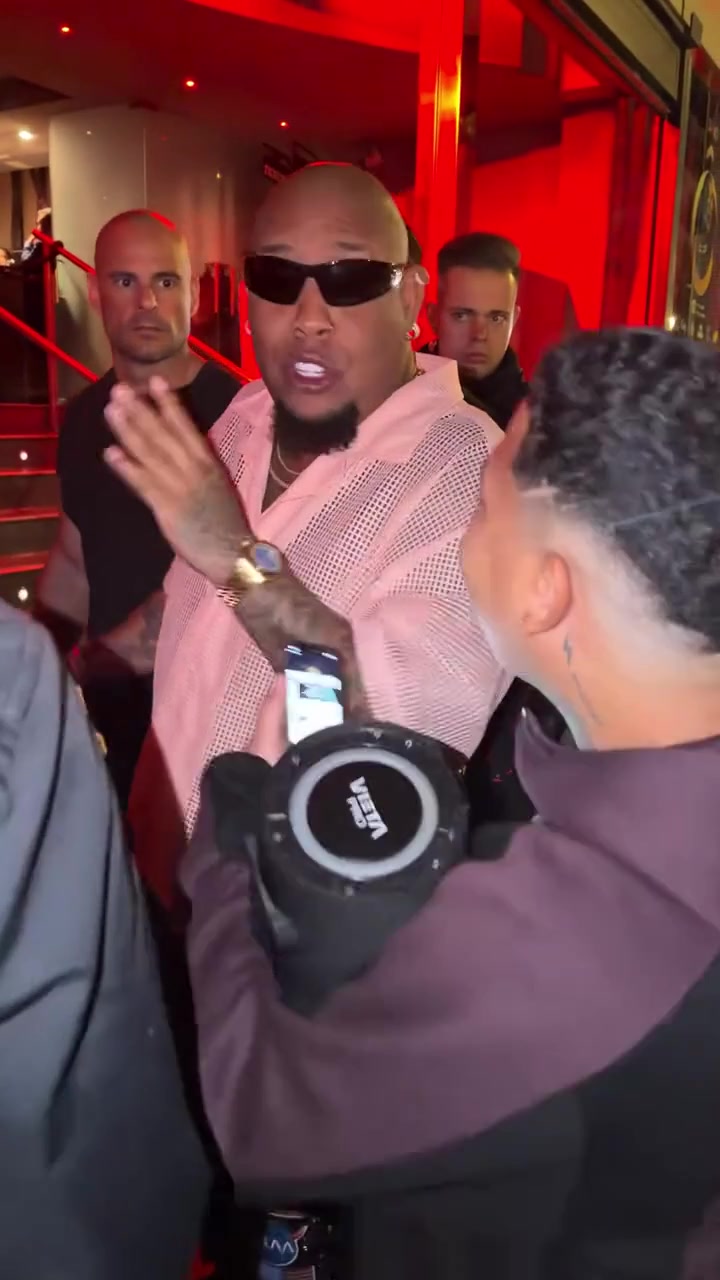
Make a Bulin 47 AI video starring you. The Bulin 47 AI video drops you into the street freestyle that took over every feed in October: the red restaurant doorway, the portable speaker, the crowd and the Dame Hombro shoulder bounce. Upload one photo and the Bulin 47 AI generator turns you into the performer in the checked suit, keeping the beat, the camera and the energy of the original.
What is the Bulin 47 AI video trend?
The Bulin 47 AI video trend comes from a real street moment. Bulin 47, a Dominican dembow artist, improvised a rap outside a restaurant in Spain while Kevin Wai played the beat on a portable speaker. A small crowd gathered at the red doorway, phones came out, and the clip passed 50 million views in a matter of days.
What people copy is the attitude. Bulin 47 rides the beat with a loose, confident flow and a shoulder move from Dame Hombro that everyone recognized after the first watch. When creators started making a Bulin 47 AI video with their own face, the format took off a second time. Friends, pets, coworkers and cartoon characters all ended up in front of that red doorway.
A Bulin 47 AI video keeps the setting, the speaker holder, the crowd and the timing of every move. Only the main performer changes. That is what makes the result instantly readable as the Bulin 47 trend while still being about you.
How to make a Bulin 47 AI video in three steps
Upload your photo
Add one clear photo of the person you want in the clip. The Bulin 47 AI generator replaces the main performer in the tan checked suit. The person holding the speaker and the people around the doorway stay as they are.
Pick a quality
Choose 480p, 720p HD or 1080p Full HD. Every Bulin 47 AI video is 15 seconds long in vertical 9:16, ready for TikTok, Reels and Shorts.
Generate and download
Press Generate. The AI follows the original freestyle beat for beat, including the shoulder bounce, and swaps in your face, hair and outfit. Most clips are ready in a few minutes, and your Bulin 47 AI video waits in My creations if you close the page.
Best photos for a Bulin 47 AI video
The original freestyle is shot outdoors in daylight with the performer facing the phone, so photos with the same feel give the most natural Bulin 47 AI video.
- Use a waist-up photo. The swap uses your outfit as well as your face, and a waist-up shot gives it more to work with.
- Face the camera with your eyes visible and your hair out of your face.
- Pick daylight or bright indoor light. Avoid strong colored lighting.
- Use one person per photo. Crop group pictures first.
- Skip heavy beauty filters. They make skin look flat once it moves.
- A slight smile or a confident look matches the mood of the Bulin 47 trend.
Pets and characters also work in a Bulin 47 AI video. Choose an image where the face is front facing and sharp.
Bulin 47 AI video ideas that work
The best Bulin 47 AI video puts someone unexpected in front of the red doorway. Ideas that get shared:
- Yourself, for the classic version of the Bulin 47 trend.
- Your dog or cat doing the Dame Hombro shoulder bounce.
- A friend on their birthday, posted as a surprise.
- Your boss or teacher, with their permission, for a team or class account.
- A grandparent, because nobody expects the freestyle from them.
- A favorite cartoon or game character.
- A brand mascot for a fun social post.
If you run a page, make a Bulin 47 AI video for each member of a group and post them as a series. Followers vote on whose freestyle hit hardest.
Tips for a better Bulin 47 AI result
A few small choices make the difference between a good Bulin 47 AI video and a great one.
- Choose a photo where your shoulders are visible. The signature move is in the shoulders.
- Avoid hats that cover the forehead. The original performer is bare headed and the swap looks cleaner without a hat.
- Wear, or pick a photo with, a jacket or shirt with some structure. It reads better than a plain tee in motion.
- Use 720p HD or 1080p Full HD for posting. 480p is good for a quick test of a new photo.
- If the face looks off, change the photo rather than repeating the same one. The input photo matters most.
Bulin 47 AI video vs a regular face swap
A regular face swap places a face onto an existing clip, frame by frame. A Bulin 47 AI video goes further: the AI rebuilds the main performer with your face, hairstyle and visible outfit, then animates that person through the whole freestyle. Head turns, the shoulder bounce and the way the performer leans toward the crowd all follow the original timing.
Because the whole performer is rebuilt, the Bulin 47 AI video avoids the flickering edges and mismatched skin tones that face swap apps often leave. You also only need one still photo. There is no need to film yourself dancing or rapping. The Bulin 47 AI generator handles the motion from the reference clip.
If an earlier attempt at the Bulin 47 trend in another app looked stiff, try a brighter, waist-up photo here. Most problems with a Bulin 47 AI video come from dark or tightly cropped photos.
Why the Bulin 47 trend went viral
The Bulin 47 trend spread because it felt real. It was not a studio video or an ad. It was a street freestyle with a crowd reacting live, and viewers could feel the energy through the screen. The beat is catchy, the shoulder move is simple enough to copy and the red doorway makes the clip recognizable at a glance.
When AI made it possible to step into that moment, the Bulin 47 AI video became a way to join the trend without dancing on camera. People who would never film themselves freestyling could still post their own Bulin 47 AI video, and that opened the trend to a much bigger audience.
Who makes a Bulin 47 AI video
Most people who make a Bulin 47 AI video are not dancers or rappers. They are friends who want a quick laugh in the group chat, pet owners who want their dog to steal the show, and small creators who want to join a trend without filming themselves. The Bulin 47 AI generator gives all of them the same polished freestyle from a single photo.
Brands and community pages use the Bulin 47 trend too. A team member or a mascot in a Bulin 47 AI video is a light, friendly post that fits feeds full of the original clip. Always get permission before you use someone else's photo.
How to post your Bulin 47 AI video on TikTok, Reels and Shorts
Your Bulin 47 AI video is already 9:16, so it uploads to TikTok, Instagram Reels and YouTube Shorts without cropping.
- Use a caption that names who is in it, for example "my grandpa doing the Bulin 47 freestyle".
- Add the original Bulin 47 sound on TikTok so your post appears with the trend.
- Tag the friend you swapped in. They are likely to repost.
- Post while the Bulin 47 trend is hot and try a few different people in a row.
Bulin 47 AI video quality and credits
Each Bulin 47 AI video costs credits based on quality: 20 credits for 480p, 45 credits for 720p HD and 80 credits for 1080p Full HD. The cost shows next to the Generate button before you start. If a task fails, the credits go back to your balance. Credits work on every template, so you can make a Bulin 47 AI video and then try another trend with the same balance.
Bulin 47 AI video FAQ
Who gets replaced in the Bulin 47 AI video?
Only the main performer in the checked suit. The person holding the speaker and the crowd at the doorway stay as they are.
How many photos do I need for a Bulin 47 AI video?
One. A clear, waist-up photo of one person gives the best Bulin 47 AI video.
Can I use a photo of my pet?
Yes. Pets and cartoon characters work in a Bulin 47 AI video as long as the face is clear and facing the camera.
How long is a Bulin 47 AI video?
Every Bulin 47 AI video is 15 seconds long in 9:16, ready for TikTok, Reels and Shorts.
Does the Bulin 47 AI video keep the music?
Yes. The clip follows the original rhythm and timing so the freestyle and the shoulder bounce line up with the beat.
Is this Bulin 47 AI generator official?
No. This is an independent fan template, not affiliated with Bulin 47 or Kevin Wai.
More AI rap video templates
 New
New