Duos & crews
Walk It Talk It AI Video Generator
Make a Walk It Talk It AI video with your best friend riding shotgun. The Walk It Talk It AI video puts two people in the carpool, trading the Migos verse seat to seat while the dash camera rolls. Upload two photos and the Walk It Talk It AI generator swaps you both into the car, keeping the cuts, the camera angle and the beat of the original.
What is the Walk It Talk It AI video trend?
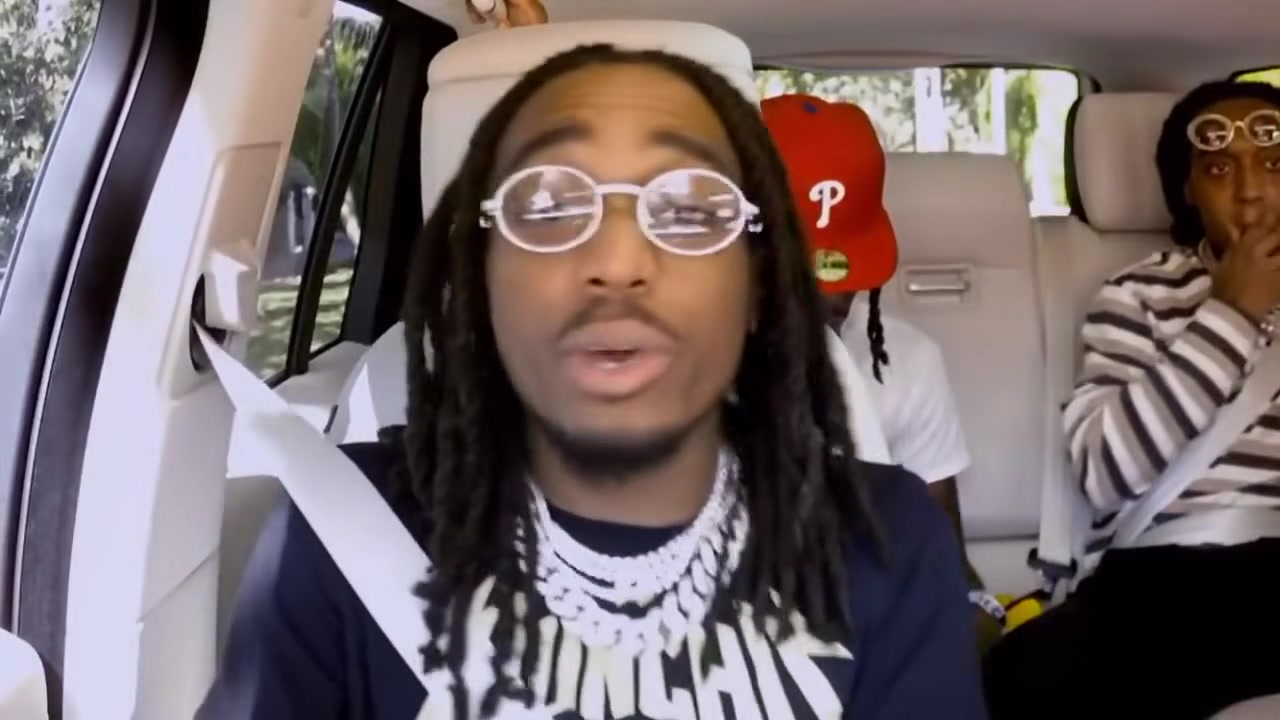
The Walk It Talk It AI video trend is built on a carpool clip where the passengers pass around a verse of Walk It Talk It by Migos featuring Drake. A camera fixed to the windshield catches everyone in the car, and the edit jumps from seat to seat as each person takes a line. It feels like a road trip with your friends at full volume.
In September the format turned into a friend group trend. People started making a Walk It Talk It AI video with their own crew, swapping faces into the car so they could join without filming in a moving vehicle. It became a way to celebrate a friendship, a team or a family road trip.
A Walk It Talk It AI video keeps the car, the dash camera angle, the quick cuts and the rhythm. Two of the performers change, so the clip reads as the Walk It Talk It trend while starring you and a friend.
How to make a Walk It Talk It AI video in three steps
Upload two photos
Add one photo for the front seat and one for the back seat. The front seat photo replaces the rapper in the front, and the back seat photo replaces the rapper behind them. Each photo should show one person.
Pick a quality
Choose 480p, 720p HD or 1080p Full HD. Every Walk It Talk It AI video is 15 seconds long in vertical 9:16.
Generate and download
Press Generate. The AI keeps the car, the camera and the cuts, and swaps in both faces and outfits. Most clips are ready in a few minutes. Your Walk It Talk It AI video is saved in My creations.
Best photos for a Walk It Talk It AI video
Car interiors are dim and the camera is close, so clear, bright photos make a big difference.
- Use bright, sharp photos. The car is darker than most rooms.
- Show the head and shoulders, the part of each rapper you see in the car.
- Face the camera or turn slightly toward the middle of the car.
- One person per photo. Crop group shots first.
- Avoid hats that throw a shadow over the eyes.
- Pick two photos with similar framing so both rappers look the same size.
Pets in a Walk It Talk It AI video are a favorite. A dog in the back seat with its head up is an instant classic.
Walk It Talk It AI video ideas that work
The best Walk It Talk It AI video celebrates the people you ride with. Ideas that get shared:
- You and your best friend, on the anniversary of your first road trip.
- Two siblings, front and back, like every family drive.
- A couple heading out on vacation.
- Two teammates on the way to a game.
- You and your dog, who always gets the back seat.
- Two coworkers on the commute, with permission.
- A parent and a teenager, swapping control of the music.
Make a Walk It Talk It AI video for each pair in your group and post them as one carpool series.
Tips for a better Walk It Talk It AI result
A few small choices improve every Walk It Talk It AI video.
- Match the lighting of the two photos so the pair looks like they share one car.
- Put the more energetic friend in the front seat. That spot gets the most screen time.
- Choose 720p HD or 1080p Full HD for posting.
- Avoid sunglasses in the back seat photo. The back seat is already dark.
- If a face looks off, try a different photo instead of the same one again.
Walk It Talk It AI video vs a regular face swap
A face swap app pastes faces onto the original passengers, which often breaks when the camera cuts between seats. A Walk It Talk It AI video rebuilds both people from your photos and animates them through every cut, so each rapper stays consistent from shot to shot.
That is why a Walk It Talk It AI video looks like a real ride rather than an edit. You also do not need to film in a car. Two still photos are enough for the Walk It Talk It AI generator to make the full clip.
If a version from another app looked patchy, try brighter photos here. Light matters most in a car scene.
Why the Walk It Talk It carpool went viral
The Walk It Talk It carpool went viral because it captures a feeling everyone knows: singing too loud in the car with your friends. Walk It Talk It is a song people know word for word, and the seat to seat edit turns one verse into a group performance.
The Walk It Talk It AI video made that feeling easy to share. Friends who live in different cities can still ride together in one Walk It Talk It AI video, and that is a big part of why the trend keeps spreading through group chats.
Why the template swaps two people
The original carpool has more than two passengers, but the Walk It Talk It AI generator swaps two of them: the front seat and the back seat rapper. Two people keep both faces large and sharp in a small car frame and make the duo the clear focus of the clip. The other passengers stay as they are, which keeps the full carpool energy around you.
If your crew is bigger than two, make several Walk It Talk It AI videos with different pairs and edit them together. That way everyone gets a seat.
Where the Walk It Talk It song comes from
Walk It Talk It is a Migos song featuring Drake from the album Culture II. Its official video, a disco style throwback, has hundreds of millions of views, and the hook became a rap catchphrase. The phrase itself means backing up what you say with what you do, which is why it fits a friend group so well: everyone in the car is hyping each other up.
The carpool version takes the song out of the studio and into everyday life. That shift is what makes a Walk It Talk It AI video feel personal. It is not a music video recreation, it is you and your friend in the car doing what friends do when a good song comes on.
Who makes a Walk It Talk It AI video
Friend groups make most Walk It Talk It AI videos, often for birthdays, reunions or the start of a road trip. Families use the Walk It Talk It AI generator to put parents and kids in the car together, and teams use it before a big game. Always ask before you use someone else's photo.
How to post your Walk It Talk It AI video
Your Walk It Talk It AI video is 9:16, ready for TikTok, Instagram Reels and YouTube Shorts.
- Use a caption about the ride, for example "every road trip with us".
- Add the Walk It Talk It sound on TikTok so your post joins the trend.
- Tag your co-pilot. Duo posts travel further when both people share them.
- Post a series with different pairs from the same group.
Walk It Talk It AI video quality and credits
A Walk It Talk It AI video costs 20 credits at 480p, 45 credits at 720p HD and 80 credits at 1080p Full HD. The cost appears next to the Generate button before you start, and failed tasks return their credits. Credits work on every template on the site.
Walk It Talk It AI video FAQ
How many people can I swap in a Walk It Talk It AI video?
Two, the front seat rapper and the back seat rapper.
Can I use the same photo twice?
Yes, but two different people make the Walk It Talk It AI video funnier.
Can my dog ride in the back seat?
Yes. Pets work well in the back seat of a Walk It Talk It AI video.
How long is a Walk It Talk It AI video?
Each Walk It Talk It AI video is 15 seconds long in 9:16.
How long does it take?
Most videos are ready in a few minutes. You can find the result in My creations.
Is this Walk It Talk It AI generator official?
No. This is an independent fan template, not affiliated with Migos or Drake.
More AI rap video templates
 New
New New
New